
LinkedIn Games: Play Free Daily Puzzles in 2026
Introduction
If you’ve opened LinkedIn lately and spotted something that looks more like a game than a job board, you’re not alone. LinkedIn Games is one of the most surprising features the platform has ever launched — and honestly, people are hooked.
These free daily brain puzzles live right inside the LinkedIn app and website. You can play them in just a few minutes, challenge your coworkers, and even see how you stack up against your network. Think of it like NYT Games free puzzles, but built into your professional profile.
Whether you’re here to find today’s LinkedIn Pinpoint answer, understand how Queens LinkedIn works, or just curious about what all the fuss is about — this guide covers everything you need to know, in plain, simple language.
What Are LinkedIn Games and Why Are People Obsessed?
LinkedIn surprised a lot of people when it rolled out its own set of daily word and logic games. At first, it seemed odd — why would a professional networking site add puzzles? But it quickly made sense.
The games give people a low-pressure way to check in on LinkedIn every day. Instead of scrolling job posts or reading articles, you solve a quick puzzle, share your result with your connections, and move on. It’s social, it’s fun, and it keeps people coming back.
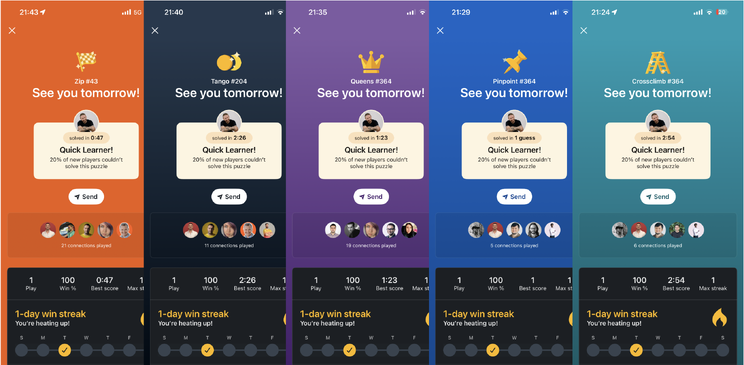
Right now, LinkedIn offers three main games:
- Pinpoint — a word association game where you guess a category from clues
- Queens — a logic puzzle inspired by chess, where you place queens on a board
- Tango — a sun-and-moon matching grid puzzle
Each game resets daily, just like NYT Games free puzzles or Wordle. That daily refresh is part of what makes them so addictive.
How to Play LinkedIn Pinpoint — The Most Popular Game
If there’s one LinkedIn game that people search for the most, it’s Pinpoint. And once you understand how it works, it’s easy to see why.
What Is LinkedIn Pinpoint?
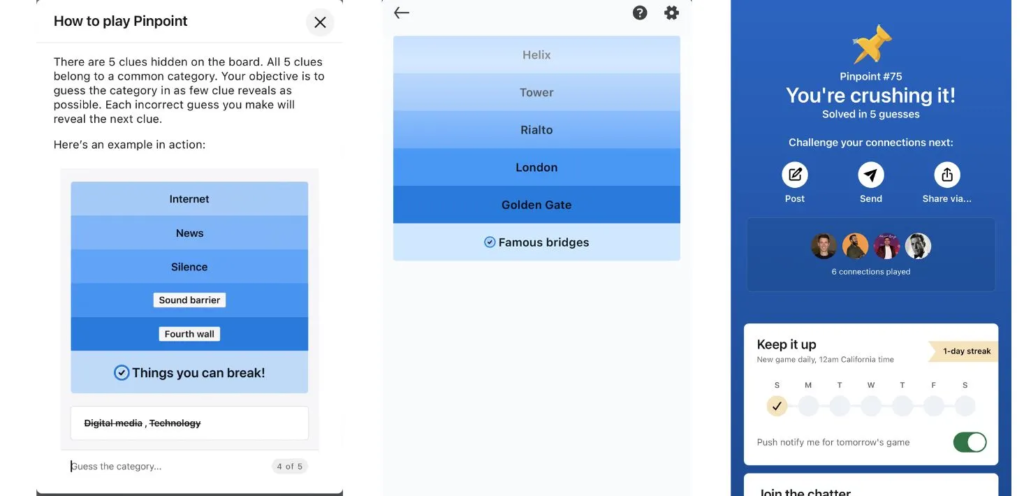
LinkedIn Pinpoint gives you up to five clue words. Your job is to figure out the one category that connects all of them. The fewer clues you use, the better your score.
For example, if you see words like Stripe, Spot, Checker, and Plaid, the answer might be Patterns. Simple in concept — but surprisingly tricky in practice.
How to Find the LinkedIn Pinpoint Answer Today
Every day, thousands of people search for “LinkedIn Pinpoint answer today” because the puzzles can genuinely stump you. That’s not cheating — it’s just part of the fun conversation around the game.
Several websites post daily answers for LinkedIn Pinpoint, similar to how Wordle answers get shared. Just search “Pinpoint LinkedIn answer today” and you’ll find community forums and game blogs with the solution.
Tips to Solve Pinpoint Faster:
- Start with the first clue only — try to answer before seeing the others
- Think broadly at first (materials, colors, verbs, places)
- If you’re stuck, ask yourself: what do all these words have in common that isn’t obvious?
LinkedIn Queens — The Logic Puzzle That Sounds Simple But Isn’t
Queens LinkedIn is the game that makes people feel both smart and completely stumped — sometimes in the same two minutes.
How Does Queens LinkedIn Work?
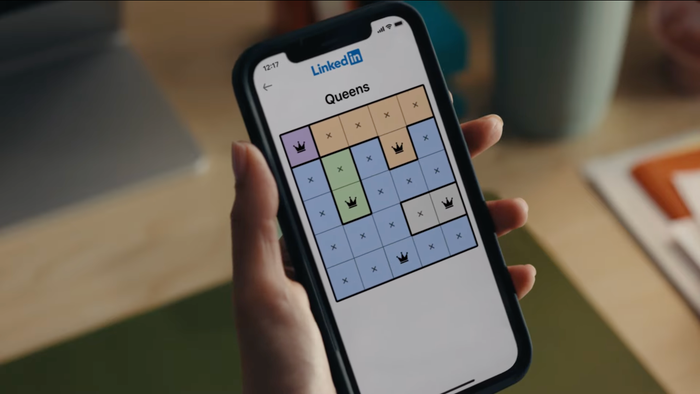
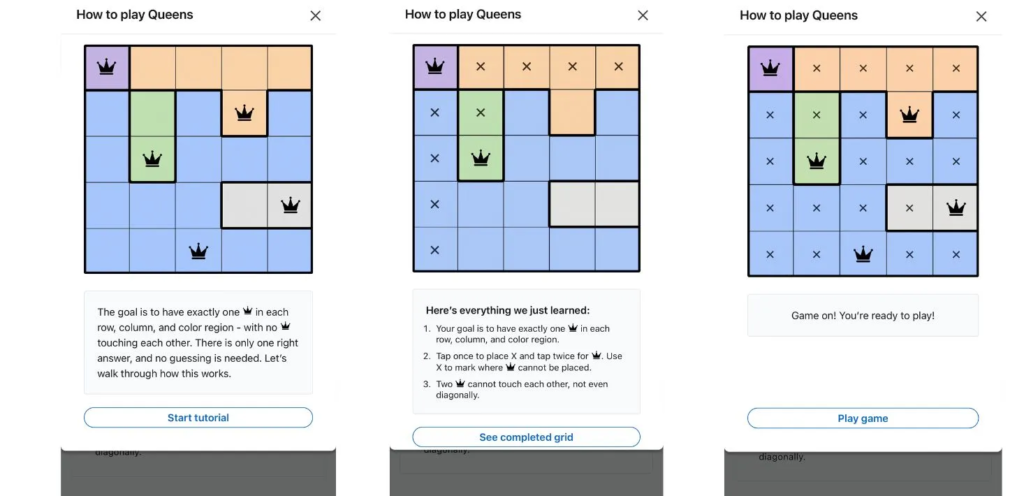
The Queens game gives you a colored grid. Your goal is to place exactly one queen in each row, column, and color region — without any two queens touching each other, even diagonally.
It’s based on the same logic as classic constraint puzzles. Each puzzle has one correct solution, and the satisfaction of finding it is genuinely rewarding.
Strategy Tips for LinkedIn Queens
- Start with regions that have only one or two available squares — those constrain your choices fastest
- Use a process of elimination: if a queen goes in one spot, mark all the squares it blocks
- Work from the outside in — edge and corner regions often have fewer options
Many players find Queens LinkedIn harder than Pinpoint on first try. But once you develop an eye for the logic, it becomes almost meditative.
LinkedIn Tango — The Newest Daily Puzzle Explained
LinkedIn Tango is the most recently introduced game and it’s catching up fast in popularity. The name comes from the sun-and-moon theme running through the puzzle.
What Is LinkedIn Tango?
Tango gives you a grid where you need to fill each cell with either a sun or a moon symbol. The rules are simple but strict:
- No more than two of the same symbol can appear side by side (horizontally or vertically)
- Each row and each column must have an equal number of suns and moons
- Some cells are pre-filled to give you starting points
It sounds like a variation of the classic binary puzzle or Binairo, but with a LinkedIn twist. Players who enjoy Sudoku-style logic will feel right at home with LinkedIn Tango.
Tango LinkedIn Tips for Beginners
- Look for rows or columns that are almost complete — fill those first
- If two of the same symbol are already adjacent, both neighbors must be different
- Work from certainty outward — never guess randomly

LinkedIn Games vs NYT Games Free — How Do They Compare?
It’s natural to compare LinkedIn’s puzzles to the New York Times games, which basically invented the modern daily puzzle craze. Both offer free puzzles that reset daily, but they have different personalities.
NYT Games Free — What’s Available?
The NYT Games platform includes Wordle, Connections, Mini Crossword, Spelling Bee, and the NYT History Quiz. Most of these are free with an occasional soft paywall. Players love them for their polish and variety.
LinkedIn Games — The Professional Edge
LinkedIn’s games have a unique feature: you can see how your connections performed on the same puzzle. That social layer adds a fun competitive element you won’t find in a typical puzzle app.
The games are completely free with no paywalls. There’s no subscription needed — just open LinkedIn and play.
Feature Comparison:
| Feature | LinkedIn Games | NYT Games Free |
|---|---|---|
| Cost | Free | Mostly free |
| Daily reset | Yes | Yes |
| Social sharing | LinkedIn network | General sharing |
| Game types | 3 (Pinpoint, Queens, Tango) | 6+ (Wordle, Connections, etc.) |
| History quiz | No | Yes |
How LinkedIn Games Help You at Work (Really)
This might sound like a stretch, but playing LinkedIn games actually has some real benefits for your work life — beyond just filling five minutes before a meeting.
Cognitive Benefits of Daily Puzzles
Research consistently shows that logic puzzles and word games help improve working memory, pattern recognition, and problem-solving speed. The same skills that make you better at Pinpoint LinkedIn also sharpen your thinking at work.
Networking Through Games
Here’s something clever: when you complete a LinkedIn game, you can share your score with your network. This gives you a low-effort way to stay active on LinkedIn without posting about career milestones. It’s conversation-starting content that feels human.
Some people use it as a casual icebreaker — “Hey, did you solve Tango LinkedIn today? I got stuck on the third row!” — which can lead to real professional conversations.
Other Free Puzzle Games Similar to LinkedIn Games
If you love LinkedIn’s games and want more options, there are several great alternatives worth exploring.
Word Connect
Word Connect is a popular mobile game where you connect letters on a grid to form words. It’s more casual than LinkedIn Pinpoint but scratches a similar itch. Great for downtime.
Spill App
The Spill app is a social platform with built-in community games and word challenges. It blends social networking with casual gaming in a way that feels similar to LinkedIn’s social puzzle sharing.
NYT Connections and History Quiz
If you haven’t tried NYT Connections yet, it’s one of the best free puzzle games available. You sort 16 words into four hidden categories — it’s the closest thing to Pinpoint LinkedIn you’ll find outside of LinkedIn itself.
The NYT History Quiz is a newer addition that tests general knowledge with a historical twist. Perfect for trivia lovers who want more than just word games.

LinkedIn Games Answers Today — Where to Find Them
One of the top searches around LinkedIn games is for daily answers — especially for Pinpoint LinkedIn. This is completely normal. Even the best puzzle players get stumped sometimes.
Best Places to Find LinkedIn Games Answers Today
A few reliable resources post daily LinkedIn game solutions:
- Reddit communities like r/linkedin or game-specific subreddits share answers each morning
- Game walkthrough blogs post Pinpoint, Queens, and Tango solutions daily
- Twitter/X threads often get updated with solutions within minutes of reset
When searching, use terms like “LinkedIn games answers today” or “LinkedIn Pinpoint answer today [date]” to find the most current posts.
A note of honesty: looking up answers is fine. These aren’t exams — they’re meant to be fun. If you’re stuck, get the answer, understand why it works, and enjoy the learning.

Frequently Asked Questions About LinkedIn Games
Q1: Are LinkedIn Games completely free to play?
Yes, all LinkedIn games — Pinpoint, Queens, and Tango — are 100% free. You just need a LinkedIn account, which is also free.
Q2: How often do LinkedIn Games reset?
LinkedIn games reset once every 24 hours, typically at midnight in your local time zone. Each day brings a new puzzle for all three games.
Q3: Can I play LinkedIn Games on mobile?
Absolutely. LinkedIn Games work on both the LinkedIn mobile app (iOS and Android) and the desktop website. The experience is nearly identical on both.
Q4: What is the LinkedIn Crossclimb game?
LinkedIn Crossclimb is another word puzzle that occasionally appears in LinkedIn’s games section. In Crossclimb, you change one letter at a time to climb from one word to another — similar to a word ladder game.
Q5: Where can I find today’s LinkedIn Pinpoint answer?
Reddit, Twitter/X, and dedicated puzzle blogs post daily Pinpoint answers shortly after each reset. Search “LinkedIn Pinpoint answer today” with the current date for the fastest results.
Q6: How does LinkedIn Queens differ from normal chess queens?
In chess, a queen moves in any direction. In LinkedIn Queens, the queen placement is purely about logic constraints — each queen must be alone in its row, column, and colored region, with no queens touching diagonally.
Q7: Are there LinkedIn Games for job seekers specifically?
Not directly — the games are for all LinkedIn users. However, they’re a great way to stay active on LinkedIn and engage your network, which is indirectly helpful for job seekers who want to keep their profile visible.
Conclusion
LinkedIn Games turned out to be one of the most unexpectedly delightful features LinkedIn has ever released. What started as a quirky addition to a professional network is now a daily ritual for millions of users worldwide.
Whether you’re grinding for the perfect Pinpoint score, carefully placing queens on a colorful grid, or balancing suns and moons in Tango, these games offer a genuine mental workout that’s actually enjoyable. They’re free, fast, and social in all the right ways.
Compared to NYT Games free options or apps like Word Connect, LinkedIn’s puzzles have one major advantage: your whole professional network is playing the same game on the same day. That shared experience turns a simple puzzle into a conversation — and that’s what makes LinkedIn games worth playing every single day.
Now go open LinkedIn, click on that little game icon, and see how you do today. Your connections are already waiting.